요즘 부산 상어 출몰 소식 보셨나요? 부산 북항 바다에 상어가 나타나면서 '생닭 던진 아저씨', '대박 난 이디야 점주님' 같은 에피소드가 인터넷을 뜨겁게 달궜죠.
저는 이 이야기를 30초짜리 AI 애니메이션 <길치상어 부캉이 이야기>로 만들었고, 인스타그램에서 단 하루만에 40만 뷰를 돌파했습니다. 저도 했으니 여러분도 하실 수 있어요. 쉽게 내용을 정리했습니다.
이 글에서는 AI 영상 제작이 처음인 분도 따라 할 수 있게, 챗GPT로 스토리보드를 만들고 시댄스 2.0으로 애니메이션을 제작한 과정을 순서대로 정리했어요.
👉 완성본 먼저 보기: 부캉이 이야기 (인스타그램)
로그인 • Instagram
www.instagram.com
🦈 제가 실제로 입력한 프롬프트까지 그대로 공개합니다. 복사해서 바로 써보세요!
⚡ 딱 4단계예요
| 단계 | 하는 일 | 도구 |
|---|---|---|
| 1 | 주제 잡기 | 인터넷 (밈·썰) |
| 2 | 스토리보드 이미지 만들기 | 챗GPT 또는 코덱스 |
| 3 | 영상 만들기 | 시댄스 2.0 (지크) |
| 4 | 편집 · 자막 · BGM | Edits 앱 (캡컷, 프리미어 프로도 OK) |
STEP 1. 주제를 잡는다
저는 인터넷을 자주 하면서 밈이나 썰 같은 걸 흥미롭게 보는 편이에요.
이번에도 부산 상어 관련해서 '생닭 던진 아저씨', '대박 난 이디야 점주님' 같은 에피소드가 계속 올라오는 걸 보고 화제성을 느꼈어요.
그래서 모두가 아는 '부산 상어 출몰' 주제에 사람 냄새 나는 실제 에피소드를 붙였습니다.
💡 TIP. 시의성 있는 주제를 찾는 습관
요즘 사람들은 어떤 이야기에 반응할까? 레이더를 켜고 세상을 바라봐요.
시의성 있는 주제를 잡는 게 조회수 높은 영상의 첫걸음이에요. 화제성에 얹혀갈 수 있거든요.
STEP 2. 챗GPT로 스토리보드 이미지 만들기
챗GPT나 코덱스(codex)를 사용해서 이미지를 만들어요. (코덱스는 유료 구독이 필요해요)
어렵게 생각할 필요 없어요. 말하듯이 쓰면 됩니다. 제가 실제로 입력한 문장이에요.
① 첫 번째 요청 — 부산 상어 관련 게시물 캡처, 댓글 캡처, 실제 상어 사진, 부산 바다 사진을 같이 첨부했어요.
부산에 상어가 나타났는데. 이걸 주제로 30초짜리 애니메이션 만들고싶어. 우선이미지를 만들어줘
② 두 번째 요청 — 원하는 장면을 구체적으로 말해줘요.
스토리보드 이미지로 만들어줘.
바다에 상어가 있고, 한 아저씨가 생닭을 던져줘.
옆에는 '이디야 죠스점' 간판이 있는 카페가 있고,
이디야 앞치마를 입은 점주님이 웃는 얼굴로 고등어를 던져줘.
남녀노소 사람들이 모여서 구경하는 장면이야.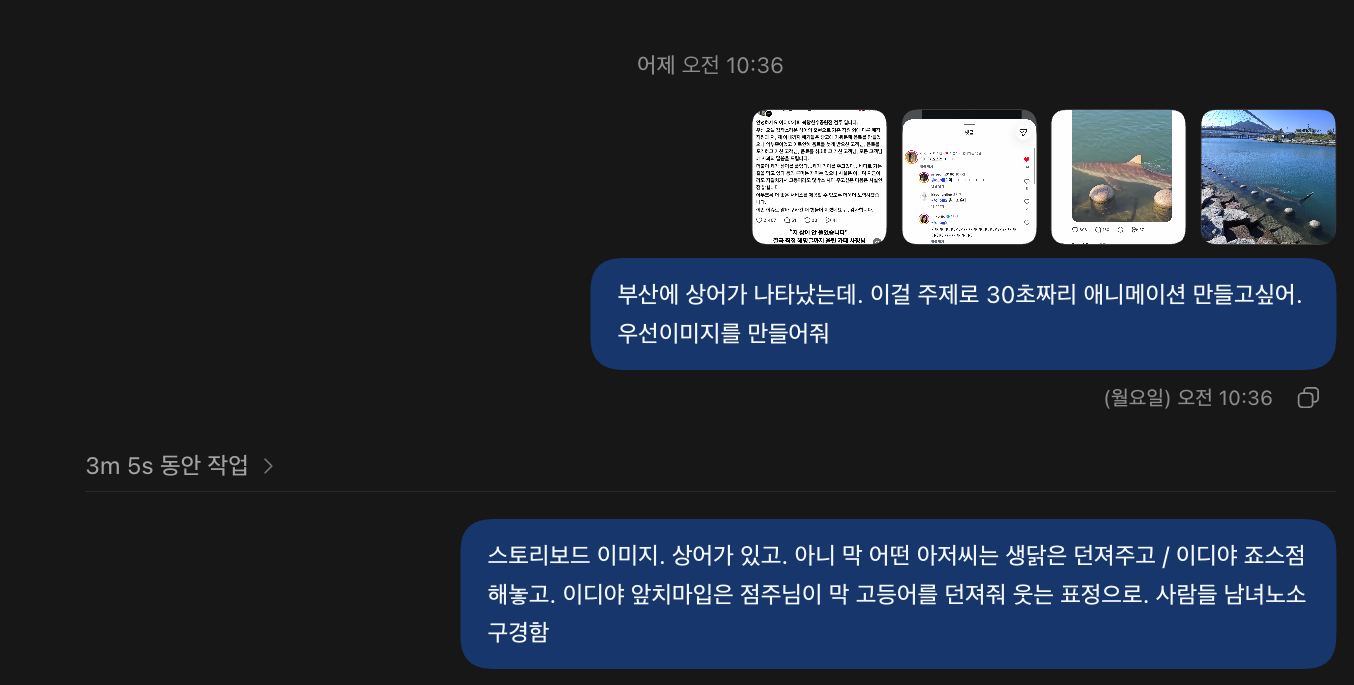
③ 디테일 추가 — 이디야 유니폼 사진, 이디야 매장 사진을 첨부했어요. 그러면 점주님 옷이랑 가게 간판이 훨씬 그럴듯해져요.
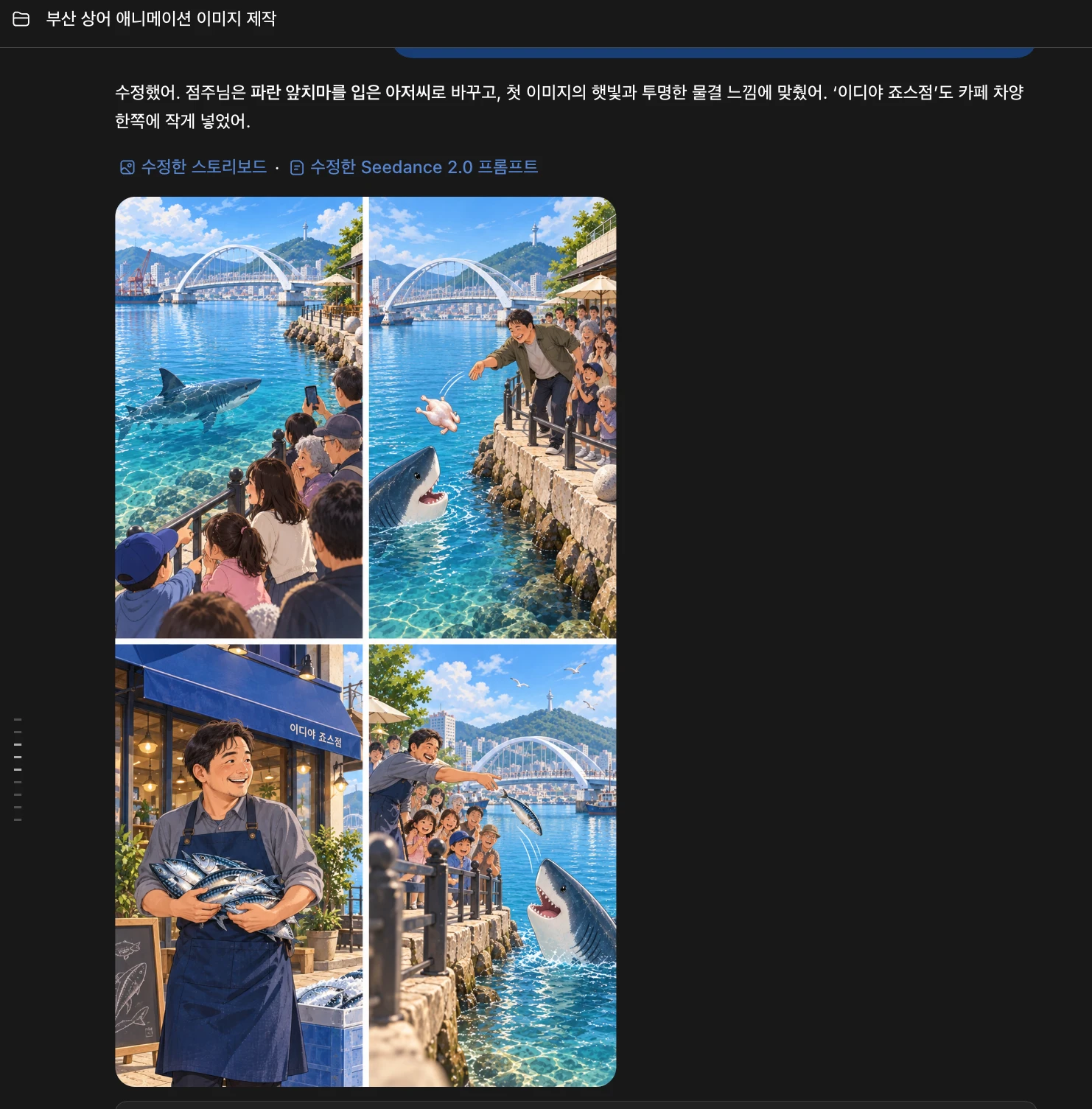
스토리보드 이미지를 보면서, 마음에 안 드는 부분은 "이건 이렇게 바꿔줘" 하고 계속 고쳐달라고 하면 돼요. 그렇게 나온 최종 이미지예요.

💡 TIP. 레퍼런스 사진을 많이 넣을수록 좋아요
글로만 설명하는 것보다, 실제 사진을 같이 첨부하면 AI가 훨씬 정확하게 그려요.
장소 사진, 유니폼 사진처럼 보여줄 수 있는 건 다 보여주세요.
STEP 3. 시댄스 2.0으로 AI 애니메이션 영상 만들기
① GPT에게 영상 프롬프트 달라고 하기
스토리보드가 나온 그 대화창에서 이렇게만 입력했어요.
위 내용을 바탕으로 seedance 2.0 (또는 2.5) 프롬프트를 영문으로 줘.영상 모델은 영어 프롬프트를 더 잘 알아들어서 영문으로 달라고 해요.
② 지크로 이동하기
저는 지크(zcre.co.kr)를 사용했어요. 힉스필드 등 시댄스 모델을 제공하는 다른 플랫폼을 써도 괜찮아요.
③ 15초씩 두 번에 나눠 만들기
30초를 한 번에 만들지 않고, 15초짜리 두 개로 나눴어요.
- 스토리보드 위쪽 4장을 잘라서 → 파트 1
- 스토리보드 아래쪽 4장을 잘라서 → 파트 2
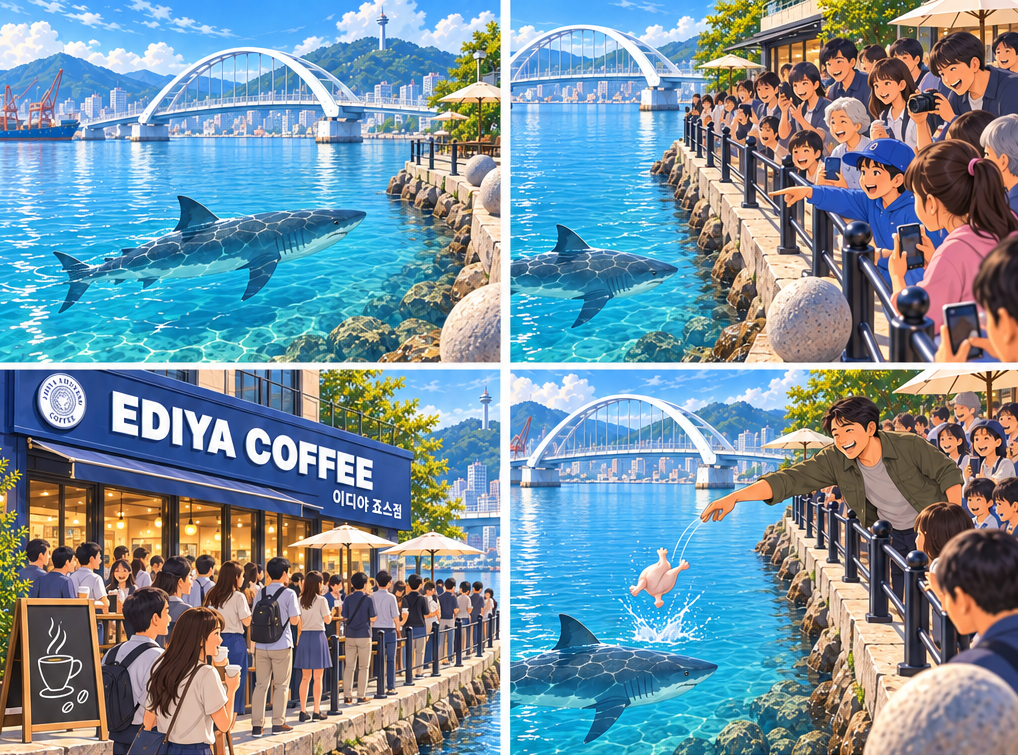
▲ 파트 1에 첨부한 위쪽 4컷
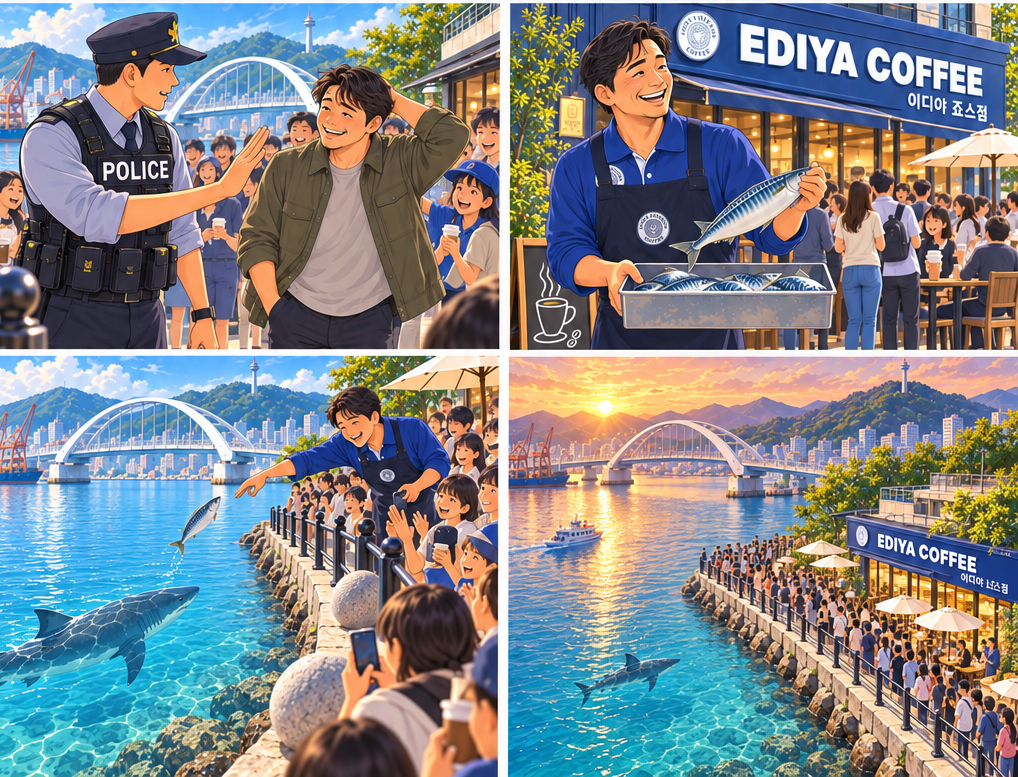
▲ 파트 2에 첨부한 아래쪽 4컷
설정은 이렇게 했어요.
| 항목 | 설정 |
|---|---|
| 모델 | Seedance 2.0 |
| 방식 | 레퍼런스 → 비디오 |
| 비율 | 9:16 (세로) |
| 화질 | 720p |
| 길이 | 15초 |
| 오디오 | 오디오 생성 켜기 |
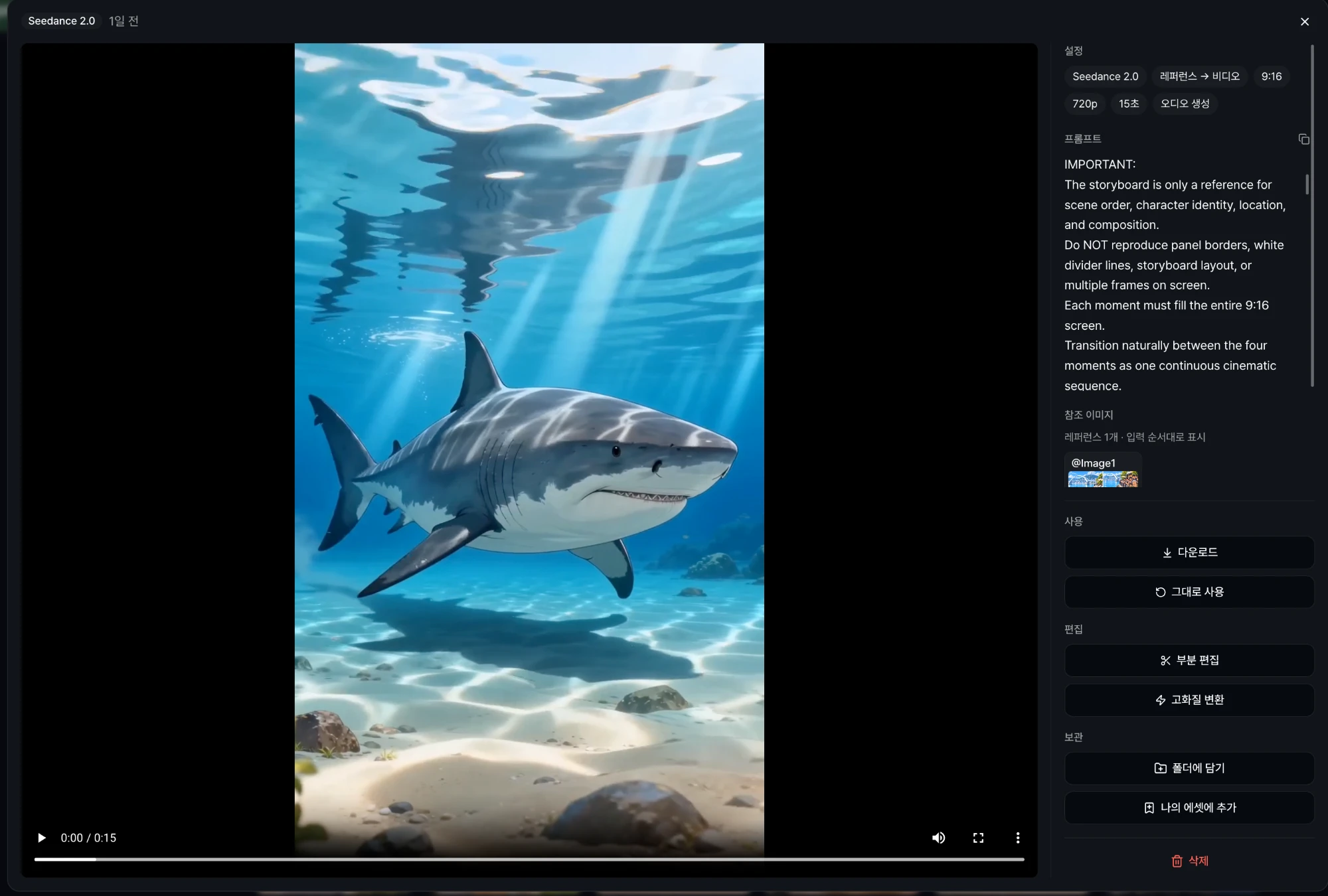
아래가 제가 실제로 넣은 프롬프트예요. 길어 보여도 겁먹지 마세요. GPT가 써준 거 그대로 복붙! 하세요
🎬 파트 1 (0~15초) — 상어 등장 → 구경하는 사람들 → 이디야 → 생닭 아저씨
Create a continuous 15-second vertical 9:16 video.

Use the attached TOP HALF of the storyboard as the visual and action reference.
The storyboard contains exactly four panels. Read them from left to right, top to bottom.

IMPORTANT:
The storyboard is only a reference for scene order, character identity, location, and composition.
Do NOT reproduce panel borders, white divider lines, storyboard layout, or multiple frames on screen.
Each moment must fill the entire 9:16 screen.
Transition naturally between the four moments as one continuous cinematic sequence.

Match the clean, luminous digital-painting / polished anime illustration style of the reference.
Clear turquoise harbor water, bright natural daylight, white arched bridge, coastal promenade, blue EDIYA COFFEE building, lively but believable crowd.

0–4 sec:
Begin close to the clear blue water.
One large shark glides slowly and calmly beneath the surface from left to right.
Its mouth stays closed and its expression remains neutral and aloof.
The camera gently tracks with the shark, then gradually rises enough to reveal the waterfront promenade and white arched bridge.

4–7 sec:
Reveal a growing crowd gathered behind the black railing.
People point toward the shark, smile, take photos and videos, and lean forward with curiosity.
Keep the shark visible below them in the water.
The atmosphere is surprising but cheerful, not dangerous or chaotic.

7–10 sec:
The camera drifts toward the nearby EDIYA COFFEE cafe.
Show a long queue outside and many customers watching the shark while holding coffee.
The cafe is busy because everyone has gathered at the waterfront.
Keep the large blue storefront visually consistent with the storyboard.

10–15 sec:
The CHICKEN MAN is:
late 50s to early 60s,
short and stocky,
round warm face,
receding curly salt-and-pepper hair,
gray moustache,
olive-green field jacket,
beige T-shirt,
charcoal trousers,
worn gray sneakers.

He leans over the railing and impulsively tosses ONE whole raw chicken into the water.

Follow the raw chicken briefly as it falls and makes a small splash.
The chicken must remain clearly recognizable as a raw chicken.
The shark remains calm and separate from the chicken.

Nearby spectators react with surprise, laughter and phones raised.

End with the chicken man still near the railing and the shark moving slowly through the water, creating a natural continuation point for Part 2.

Maintain strict visual and object continuity.
The shark, raw chicken, whole mackerel, and coffee cups are separate permanent objects.
Never transform, morph, replace, merge, or dissolve one object into another.
The shark remains one cool, aloof shark with a closed mouth and neutral eyes.
Keep all recurring people identical to their reference designs.

Natural human movement, natural water physics, restrained expressions.
No teleporting.
No object morphing.
No extra sharks.
No sudden costume changes.
No text overlays.
No subtitles.
No logos added beyond signage already present in the reference.
No split screen.
No storyboard borders.
🎬 파트 2 (15~30초) — 경찰 등장 → 점주님 고등어 → 노을 지는 바다
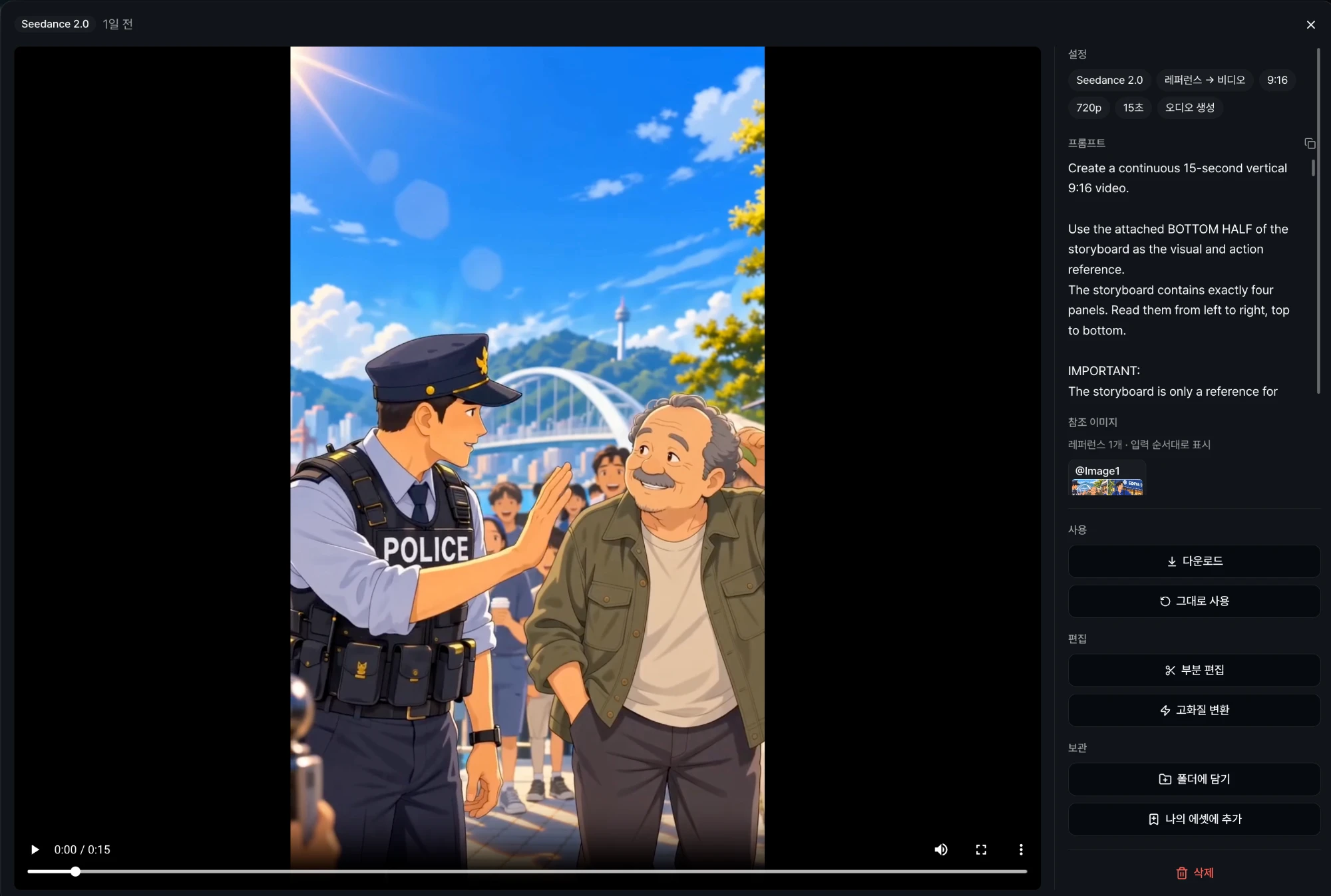
Create a continuous 15-second vertical 9:16 video.

Use the attached BOTTOM HALF of the storyboard as the visual and action reference.
The storyboard contains exactly four panels. Read them from left to right, top to bottom.

IMPORTANT:
The storyboard is only a reference for scene order, character identity, location, and composition.
Do NOT reproduce panel borders, white divider lines, storyboard layout, or multiple frames on screen.
Each moment must fill the entire 9:16 screen.

Continue directly from Part 1.
Keep the same waterfront, shark, crowd, cafe, bridge, lighting direction, and character identities.

0–4 sec:
A police officer approaches the CHICKEN MAN beside the railing.

The chicken man must remain exactly the same older character from Part 1:
short and stocky,
receding curly gray hair,
gray moustache,
olive-green jacket,
beige T-shirt,
dark trousers.

The police officer calmly raises one hand and mildly admonishes him.
The vest reads only “POLICE”.

The older man gives a sheepish smile and scratches the back of his head.
Keep the moment light and comedic rather than dramatic.

4–8 sec:
The camera naturally shifts toward the EDIYA COFFEE entrance.

He is:
early 40s,
tall and lean,
long oval face,
sharp jawline,
neatly side-parted straight black hair,
clean-shaven,
royal-blue collared shirt,
dark navy full bib apron,
dark trousers,
black shoes.

He must NEVER resemble the older chicken man.

He stands outside the busy cafe holding a metal container of silver-blue whole mackerel.
He lifts ONE clearly visible whole mackerel in his hand and looks toward the shark with a warm smile.

8–12 sec:
The cafe owner walks to the railing.

From safely behind the railing, he makes one small underhand toss of the SAME whole silver-blue mackerel.

Follow the fish continuously through the air.
The mackerel must remain a whole silver-blue fish throughout the motion.

The shark approaches calmly below.
It receives the fish with one restrained motion and then continues swimming.
Nearby people smile, clap briefly, and film the moment.

Do not make the shark aggressive.
No huge open mouth.
No attack.
No frantic splashing.

12–15 sec:
Without a hard cut, the camera slowly rises and pulls backward.

Transition toward warm late-afternoon / sunset light.

Reveal:
the shark swimming calmly through the blue water,
the crowded waterfront promenade,
the EDIYA COFFEE terrace,
the white arched bridge,
the city and mountains,
and warm golden sunlight reflecting across the harbor.

End on a peaceful wide aerial composition.
Hold the final wide view briefly.

Maintain strict visual and object continuity.
The shark, raw chicken, whole mackerel, and coffee cups are separate permanent objects.
Never transform, morph, replace, merge, or dissolve one object into another.
A mackerel must remain a silver-blue whole fish until it leaves the frame.
A coffee cup must remain a coffee cup.
The shark remains one cool, aloof shark with a closed mouth and neutral eyes.
Keep all recurring people identical to their reference designs.

Smooth cinematic pacing.
Natural motion.
No teleporting.
No new characters replacing existing characters.
No extra sharks.
No object morphing.
No split screen.
No storyboard borders.
No subtitles.
No added text overlays.
💡 프롬프트, 이 세 가지만 알면 돼요
1. 초 단위로 나눠서 쓴다 — 0~4초엔 이거, 4~7초엔 저거. 장면 순서가 안 꼬여요.
2. 인물 생김새를 자세히 적는다 — 나이, 머리, 옷까지. 그래야 장면마다 같은 사람이 나와요.
3. "변하지 마"를 못 박는다 — AI 영상은 고등어가 커피잔으로 스르륵 변하기도 해요. 그래서 "상어, 생닭, 고등어, 커피잔은 절대 서로 변하지 않는다"를 꼭 넣었어요.
STEP 4. 편집하고 자막 · BGM 넣기
저는 Edits 앱에서 파트 1, 파트 2를 이어 붙였어요. 캡컷, 프리미어 프로 등 본인이 사용하는 편집 툴을 쓰셔도 좋아요.
포인트는 어색한 부분을 잘라주고, 자막을 입혀 완성도를 높이는 단계라는 거예요.
저는 평소에 릴스를 만들 때 브금도 중요하게 여기는 편인데요. 이번엔 일부러 핑크퐁, 죠스 OST 등 상어와 연관 있는 BGM을 골랐어요.
💡 TIP. 영상과 관련된 음악을 고르세요
듣자마자 "아, 상어!" 하고 떠오르는 음악이면 영상이 훨씬 재밌어져요.
영상과 관련된 음악을 고르는 것도 중요해요.
✅ 한 줄 정리
화제 되는 주제 찾기 → GPT로 스토리보드 → GPT한테 영상 프롬프트 받아서 시댄스로 15초 × 2 → 편집 툴로 컷 정리·자막·BGM.
위 프롬프트 그대로 복사해서, 여러분만의 이야기로 바꿔보세요!
🎬 AI 애니메이션 만들기, 함께 실습하고 만들어봐요.
👉 추석 AI 콘텐츠 부트캠프 신청하기 · 9월 25일(금) 마감
💬 카마의 AI 콘텐츠 라운지에 들어오세요. AI 영상 제작 꿀팁, 고민 함께 나눠요.
👉 카마의 콘텐츠 라운지 무료입장
'AI - AI 활용 리뷰' 카테고리의 다른 글
| 마케터를 위한 AI 영상 프롬프트 꿀팁 3 (0) | 2026.09.28 |
|---|---|
| AI 영상 툴 씨댄스 2.0, 왕초보 실전 가이드 (0) | 2026.09.26 |
| 당장 업무에 도움되는 AI 정보 인스타 계정 9 (0) | 2026.09.26 |
| 마케터를 위한 AI 큐레이션 미디어 추천 4 (0) | 2026.09.22 |
| 누적 100만 뷰 영상 만든 AI 애니메이션 노하우, 이번 추석에 풉니다 (0) | 2026.09.22 |